Toshiba and Konica Minolta both make good office copiers, and either can serve a South African office well. Outsource Digital supplies Toshiba, so we are not neutral, but this guide sticks to what each maker publishes about its own machines.
One thing to know first: we could not reach a Konica Minolta South Africa product page, so the Konica Minolta figures below come from Konica Minolta's European website. Each figure links to the page it came from. Check with a local Konica Minolta dealer which models are sold here.
In short, a bizhub and an e-STUDIO of the same class are close on speed, paper size and touchscreen. The bigger difference for your office is usually the supplier and the service agreement behind the machine.
What both brands do well
Both make A4 copiers for small offices and A3 floor-standing copiers for busy ones, in colour and black-and-white. Both print, copy and scan.
Konica Minolta's bizhub i-Series has a 10.1-inch tablet-style touch panel, and the bizhub C301i page puts security first: an optional built-in Bitdefender virus scanner, encrypted storage, a Secure Erase tool that wipes the drive at the end of the copier's life, and single sign-on with Microsoft or Google accounts.
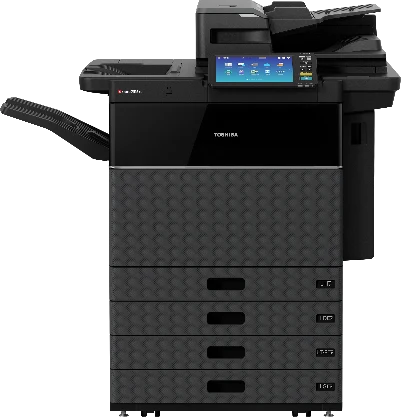
On the Toshiba side, the e-STUDIO office models we supply have the same size of touchscreen, 10.1 inches, and scan up to 240 pages a minute. Many of them take an optional finisher for stapling, hole-punching and booklets, and the range goes from a desktop copier up to a print-room machine.
Where they differ
| Toshiba e-STUDIO (what we supply) | Konica Minolta bizhub (from Konica Minolta Europe's pages) | |
|---|---|---|
| Ranges | Desktop (A4), floor-standing (A4 and A3), high volume (A4 and A3) | bizhub i-Series A3 models and A4 colour models |
| A4 colour speeds | 33 pages a minute on the desktop colour model | C3351i 33, C4051i 40 and C4751i 47 |
| A3 black-and-white speeds | 23 to 65 on office models; 65 to 90 on high-volume models | From 30 (bizhub 301i) to 75 (bizhub 751i) |
| A3 colour speeds | 20 to 65 on office models; 65 to 85 on high-volume models | From 25 (C251i) to 70 (C751i) |
| Largest paper | A4 on desktop models; A3 on floor-standing and high-volume | A4 on the A4 models; SRA3 on the A3 models |
| Touchscreen | 10.1-inch on the office models | 10.1-inch on the i-Series models listed here |
| Remote monitoring | Toshiba e-BRIDGE CloudConnect | Konica Minolta CS Remote Care |
Speeds are the makers' rated A4 pages a minute. Konica Minolta's figures were read on 4 November 2026; check the linked pages for any change.
Remote monitoring: both brands have it
Konica Minolta has a remote monitoring service, CS Remote Care. Konica Minolta describes it as a link between bizhub copiers and its service team that sends machine data in real time, warns of maintenance early, can order consumables automatically, and lets technicians update firmware and guide people at the copier from a distance.
On our Toshiba copiers the same job is done by Toshiba e-BRIDGE CloudConnect. A low toner level sets off a delivery to your office, and meter readings reach us without anyone reading the counter. Our technicians see error codes as they happen and can clear many faults from a distance. Firmware is updated in off-peak hours, the connection is encrypted, and pictures of what you print are never collected.
So remote monitoring is not a reason to choose one brand over the other. The question is whether your supplier actually uses it.
Which matters more: the brand or the service agreement?
Usually the service agreement. A bizhub and an e-STUDIO of the same speed can work out very differently over a few years. Ask each supplier: is toner in the monthly amount, are parts, labour and call-outs covered, how soon does a technician arrive, and is there a loan copier while yours is fixed? Our copier cost guide goes through what sets the monthly amount.
When you compare quotes, compare those lines first. Then compare speed and features.
What you get from Outsource Digital
We have been a Toshiba dealer since 2004 and are a Platinum Toshiba Dealer today. Copier, field and on-site support technicians work in-house, telephonic and online support sit alongside them, and with service partners in all the major cities we support offices throughout South Africa and into Namibia and Eswatini.
Under our copier service agreement:
- a technician is on site within 4 to 8 working hours of your call,
- if your copier cannot be repaired quickly, we bring a loan copier,
- toner is sent automatically before it runs out,
- parts, labour and call-outs are 100% covered,
- you get monthly usage reports.
Every copier is linked to our team through Toshiba e-BRIDGE CloudConnect, so many problems are seen before you notice them.
Which is right for you?
A Konica Minolta may suit you if:
- you already have a Konica Minolta dealer whose service you are happy with,
- your office wants the optional built-in Bitdefender virus scanner on the copier itself,
- you want your new machines to match an existing Konica Minolta fleet.
A Toshiba from Outsource Digital suits you if:
- you want one supplier for the copier, the service, the toner and the finance,
- you need a technician within 4 to 8 working hours and a loan copier if a repair takes longer,
- your offices are spread across South Africa, or into Namibia or Eswatini,
- you want a range that runs from a desktop copier to a print-room machine.
Have a Konica Minolta quote already? WhatsApp us for a Toshiba quote to compare. See the full range on our copier rental, leasing and sales page, or read how Toshiba compares with Kyocera.
Frequently asked questions
Is Toshiba or Konica Minolta better for an office copier?
Both make reliable A4 and A3 office copiers with similar speeds and a 10.1-inch touchscreen. For most offices the service agreement matters more than the brand: what it covers, how fast a technician arrives and whether you get a loan copier during repairs.
Does Konica Minolta have remote monitoring?
Yes. Konica Minolta CS Remote Care sends copier data to the service team, can order consumables and allows remote firmware updates. Toshiba's equivalent is e-BRIDGE CloudConnect, which Outsource Digital uses on the copiers it supplies.
Can I rent a Konica Minolta copier from Outsource Digital?
No. Outsource Digital supplies Toshiba e-STUDIO copiers only, to rent, lease or buy, with our own service agreement.
Which brand is cheaper to run?
Your print volume, your colour share and what the service agreement covers decide the running cost more than the brand does. Send us your monthly page count on WhatsApp and we will quote a Toshiba you can set against your Konica Minolta quote.