
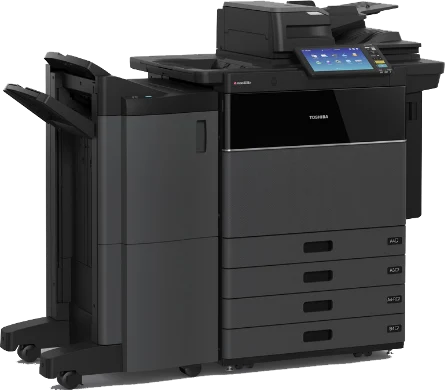
Toshiba and Kyocera both make good office copiers, and either brand can serve a South African office well. Outsource Digital supplies Toshiba, so we are not neutral, but this guide sticks to what each maker publishes about its own machines. Where we quote Kyocera, the source is Kyocera's own South African website, and each figure links to the page it came from.
The short answer: the two ranges overlap closely on speed, paper size and features. What decides your experience is usually the service agreement behind the copier, not the badge on the front.
What both brands do well
Both make A4 desktop copiers for small offices and A3 floor-standing copiers for busy ones, in colour and black-and-white. Both print, copy and scan.
Kyocera puts its long-life components first: its TASKalfa MZ4000i page says "Long-life components provide unprecedented reliability". Kyocera's A3 colour models are described as "Cloud ready", and its HyPAS platform lets dealers add custom software to the copier.
The Toshiba e-STUDIO range we supply runs from desktop machines for a small office to high-volume machines for a print room. The office models have a 10.1-inch touchscreen and scan up to 240 pages a minute, and many take an optional staple, hole-punch and booklet finisher.
Where they differ
| Toshiba e-STUDIO (what we supply) | Kyocera (from Kyocera South Africa's pages) | |
|---|---|---|
| Ranges | Desktop (A4), floor-standing (A4 and A3), high volume (A4 and A3) | ECOSYS MA (A4) and TASKalfa MZ (A3) |
| A4 desktop speeds | Black-and-white up to 44 pages a minute; colour 33 | MA4500ix up to 45 and MA5500ifx up to 55 black-and-white; MA4000cifx up to 40 colour |
| A3 office speeds | Black-and-white 23 to 65; colour 20 to 65 | Black-and-white from 32 (MZ3200i) to 70 (MZ7001i); colour from 25 (MZ2501ci) to 70 (MZ7001ci) |
| High-volume speeds | Black-and-white 65 to 90; colour 65 to 85 | Kyocera's largest models are not compared here |
| Largest paper | A4 on desktop models; A3 on floor-standing and high-volume | A4 on ECOSYS MA; A3 or SRA3 on TASKalfa MZ |
| Touchscreen | 10.1-inch on the office models | 10.1-inch on the MZ2501ci and MZ3501ci; 7-inch on the MA4000cifx |
| Remote monitoring | Toshiba e-BRIDGE CloudConnect | Kyocera Fleet Services |
Speeds are the makers' rated A4 pages a minute. Kyocera's figures were read on 4 November 2026; check the linked pages for any change.
Remote monitoring: both brands have it
Kyocera has a remote monitoring service, Kyocera Fleet Services. Kyocera describes it as a cloud service that lets dealers monitor, manage and maintain customers' devices, with real-time toner levels, counter reports for billing, and remote access for technicians.
Toshiba's equivalent is e-BRIDGE CloudConnect, and it is how Outsource Digital looks after the copiers we supply. When toner runs low, a cartridge is sent to you. Meter readings come in by themselves, error codes go straight to our technicians, who can often clear a fault without a visit, and firmware updates run in off-peak hours. The link is encrypted and no images of your documents are collected.
So remote monitoring is not a reason to choose one brand over the other. The question is whether your supplier actually uses it.
Which matters more: the brand or the service agreement?
For most offices, the service agreement. Two copiers with the same speed can cost very different amounts over their life, depending on what the agreement covers: whether toner is included, whether parts, labour and call-outs are covered, how fast a technician arrives, and what happens while your copier is being repaired. Our copier cost guide explains what sets the monthly amount.
When you compare quotes, compare those lines first. Then compare speed and features.
What you get from Outsource Digital
Outsource Digital is a Platinum Toshiba Dealer and has supplied South African businesses since 2004. Our in-house team covers copier, field and on-site support, with telephonic and online support besides, and service partners in all the major cities take that support throughout South Africa and into Namibia and Eswatini.
Under our copier service agreement:
- a technician is on site within 4 to 8 working hours of your call,
- if your copier cannot be repaired quickly, we bring a loan copier,
- toner is sent automatically before it runs out,
- parts, labour and call-outs are 100% covered,
- you get monthly usage reports.
Every copier is linked to our team through Toshiba e-BRIDGE CloudConnect, so many problems are seen before you notice them.
Which is right for you?
A Kyocera may suit you if:
- you already have a Kyocera dealer whose service you are happy with,
- your office runs software built on Kyocera's HyPAS platform,
- you want your new machines to match an existing Kyocera fleet.
A Toshiba from Outsource Digital suits you if:
- you want one supplier for the copier, the service, the toner and the finance,
- you need a technician within 4 to 8 working hours and a loan copier if a repair takes longer,
- your offices are spread across South Africa, or into Namibia or Eswatini,
- you want a range that runs from a desktop copier to a print-room machine.
WhatsApp us to compare a Toshiba quote with the quote you have. See the full range on our copier rental, leasing and sales page, or read how Toshiba compares with Konica Minolta.
Frequently asked questions
Is Toshiba or Kyocera better for an office copier?
Both make reliable A4 and A3 office copiers with similar speeds and features. For most offices the service agreement matters more than the brand: what it covers, how fast a technician arrives and whether you get a loan copier during repairs.
Does Kyocera have remote monitoring?
Yes. Kyocera Fleet Services lets a dealer monitor toner, read meters and reach the copier remotely. Toshiba's equivalent is e-BRIDGE CloudConnect, which Outsource Digital uses on the copiers it supplies.
Can I rent a Kyocera copier from Outsource Digital?
No. Outsource Digital supplies Toshiba e-STUDIO copiers only, to rent, lease or buy, with our own service agreement.
Which brand is cheaper to run?
It depends on how much you print, colour or black-and-white, and what the service agreement includes, more than on the brand. WhatsApp us your print volume and we will quote a Toshiba to compare.