
To keep your office phones working during load-shedding, put the phone system in the cloud, put your network switch, router and fibre or LTE box in a cabinet on a backup battery (UPS), and have the phone app on your staff's cellphones so calls can still be answered when the office power is off.
A cloud phone system keeps running even when your office power is off, and with the network switch on a backup battery (UPS), your desk phones keep ringing too, because the switch powers them through the network cable. Staff can also answer office calls on the phone app on their cellphones.
Why do some office phones stop working when the power goes off?
Every office phone system has a switchboard. It gives each person an extension, rings the right phone and transfers calls between staff. In an older set-up that switchboard is a box on your office wall, and it needs power from the office like everything else.
In a cloud phone system the switchboard runs online, not in your building. So when your office power goes off, the phone system itself keeps running.
What keeps working during load-shedding?
- The phone system. A cloud phone system keeps running when your office power is off.
- The phone app. Staff can answer office calls on the app on their cellphones. The app uses data or Wi-Fi, not airtime, and customers still see your office number, never a personal cellphone number.
- Calls from home. Office extensions work on the app and on computers, anywhere with internet, so staff working from home during load-shedding can still take office calls.
What needs backup power?
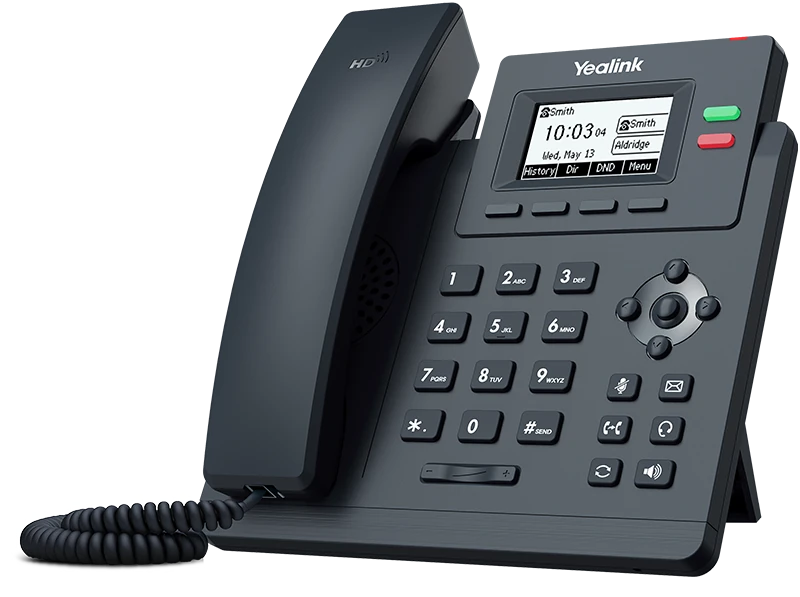
- Desk phones. The network switch powers the desk phones through the network cable, so phones and calls keep working in a power cut.
- Your router and fibre or LTE box. We install the network switch, the router and the fibre or LTE box together in a cabinet, all on a backup battery (UPS). For outages longer than 2 hours, we can supply an inverter.
With that cabinet on backup power, your team can carry on at their desks. Without it, the phone system still runs and calls can be answered on the app.
Outsource Digital supplies UPS units and inverters as backup power, so your phones and CCTV keep working during load-shedding.
What if the internet line goes down as well?
Your calls are only as reliable as the internet line they run on. Outsource Digital installs backup internet with automatic failover: if your main line goes down, your backup takes over. Each call uses very little data, roughly 100 kilobits per second, so a stable line matters more than raw speed. See business fibre and office network installation.
Do I need new desk phones?
Not always. Many existing IP phones can be reused, and we check yours first. Desk phones are also optional: some teams work only on the app, which is one less thing that needs backup power. When you do want handsets, we supply Yealink desk phones and cordless phones. See our desk phones.
What about the rest of the office?
The same thinking applies to other equipment. CCTV cameras work during load-shedding only with backup power, and the same UPS units and inverters keep them recording. See CCTV cameras for offices and shops.
What happens if my phones or internet stop working?
A technician from Outsource Digital explains the steps in our phones or Wi-Fi down video. First, we ask the client to check that there is power on site. If there is, we ask them to restart the system, which sometimes sorts the issue out. If it still does not work, we report the fault to the provider, and while that is being reported, we send technicians out to the site to find the problem.
What should I check before the next round of load-shedding?
- Is your phone system in the cloud, or in a box on the wall?
- Are your network switch, router and fibre or LTE box on a backup battery (UPS)?
- Do the people who take calls have the phone app on their cellphones?
- Do you have backup internet if your main line goes down?
How do I keep my office phones working during load-shedding?
WhatsApp us about keeping your phones working during load-shedding and tell us how many people take calls, whether you use desk phones or the app, and whether your network switch and router have backup power. We install your phone system, support it and fix it, across South Africa, with our head office in Midrand, Gauteng, our Nelspruit branch in Mpumalanga, and agents and support nationwide. Read more on our office phone systems and VoIP page.
Frequently asked questions
Do my phones work during load-shedding?
A cloud phone system keeps running even when your office power is off. With the network switch, the router and the fibre or LTE box in a cabinet on a backup battery (UPS), the desk phones keep working too. Staff can also answer on the phone app on their cellphones.
Do desk phones work without power?
Our desk phones take their power through the network cable, from the network switch. We put that switch in a cabinet with the router and the fibre or LTE box, on a backup battery (UPS), so phones and calls keep working in a power cut. For outages longer than 2 hours, we can supply an inverter.
Does my internet keep working during load-shedding?
Yes, when the router and the fibre or LTE box are on backup power. We install the network switch, the router and the fibre or LTE box together in a cabinet, all on a backup battery (UPS). For outages longer than 2 hours, we can supply an inverter.
Does the phone app use my airtime?
No. The office phone app uses data or Wi-Fi, not your airtime, to make and take calls.