
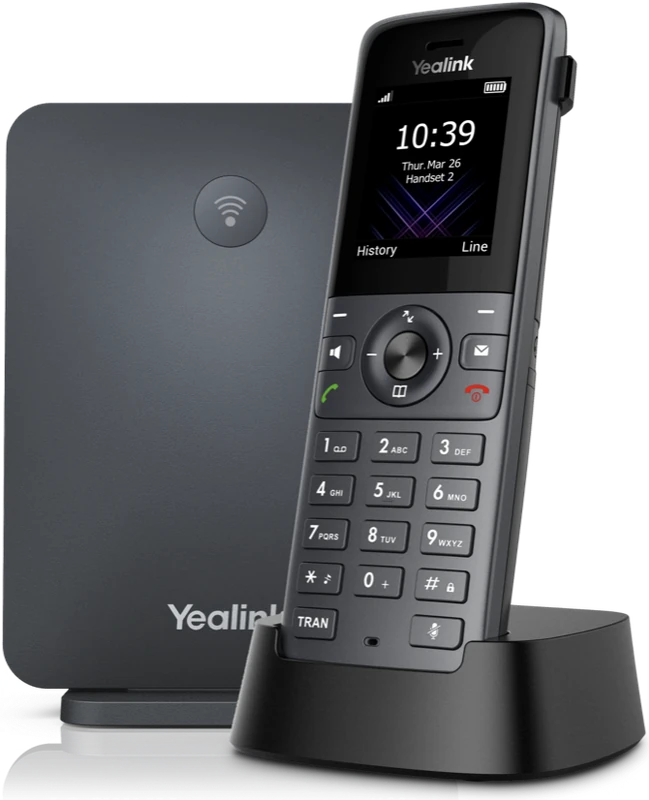
Choose a desk phone by where each person works: a corded desk phone suits reception and fixed desks, a desk phone with built-in Wi-Fi suits a desk with no network cable, and a cordless phone lets you walk around the shop, workshop or office while you talk.
Outsource Digital supplies and installs Yealink desk phones and cordless phones for offices across South Africa, and all of them work on the same office phone system, so you can mix them in one office.
Which phone suits which person?
- Reception and fixed desks: a corded desk phone.
- A desk with no network cable: a desk phone with built-in Wi-Fi.
- Moving around the shop, workshop or office: a cordless phone.
- Managers and people who handle many calls: a desk phone with a large touchscreen.
- People who move around all day: the phone app on their cellphone, with no desk phone.
Corded desk phones
A corded desk phone suits reception and fixed desks. The range runs from a classic desk phone, like the Yealink T31W, an entry-level phone with a small backlit screen and two lines for staff who mainly handle everyday calls, to desk phones with a touchscreen. The Yealink T57W has a large 7 inch touch screen and suits managers, executives and staff who handle many calls or need to see several colleagues' lines at a glance.
Wi-Fi desk phones: no cable to the desk
Some desk phones connect to the office Wi-Fi instead of a network cable. The Yealink T31W has built-in Wi-Fi on 2.4 GHz and 5 GHz, so it suits desks with no network cable. In the video above, a technician installs the office Wi-Fi first, because these desk phones do not need network cables. Outsource Digital supplies the network and the internet connection, so everything is set up by one supplier on one bill. The wireless IP phones then connect straight to the Wi-Fi, with no cabling to each desk. What is said is written out under the video, and the video also has its own page: office Wi-Fi first, then wireless desk phones.
A Wi-Fi desk phone needs a strong Wi-Fi signal at the desk. Outsource Digital installs office cabling, routers and Wi-Fi, so one team does the phones and the network. See business fibre and office network installation.
Cordless phones
A cordless phone works on the same system as the desk phones, and lets you walk around the shop, workshop or office while you talk. A cordless phone has a base station, and the handset sits in its charger. We supply cordless phones like the Yealink W73P, with its base station and charger.
The Yealink W76P kit is a base station and a handset; the base can handle up to 10 handsets, and repeaters can be added to widen the coverage. For workshops, warehouses and building sites, the Yealink W59R is a rugged cordless handset, sealed against dust and water.
Do I need a desk phone at all?
No. Desk phones are optional. The phone app puts the same office number on your cellphone and your computer, and some teams work only on the app. Many offices mix the two: a desk phone at reception and the app for people who move around. See the office phone app.
You do not always need new desk phones either. Many existing IP phones can be reused, and Outsource Digital checks yours first.
Do desk phones work without power?
The network switch powers the desk phones through the network cable, so phones and calls keep working in a power cut. We install the network switch, the router and the fibre or LTE box together in a cabinet, all on a backup battery (UPS). For outages longer than 2 hours, we can supply an inverter. The Yealink T31W, for example, can take its power through the network cable or from its own power adapter.
Can I rent desk phones?
Yes. We offer month-to-month agreements and longer-term rentals on phones. The desk phones are part of your office phone system from Outsource Digital, and we install them, support them and fix them. A technician attends within 4 to 6 business hours. See office phone systems and VoIP.
How do I choose phones for my office?
Tell us who needs a phone and where they work, and we will suggest a phone for each desk. WhatsApp us about desk phones for your office. Your own sales executive looks after your enquiry, we come to your premises to see what you have and what you need, and you get a quotation made for your environment. We install office phones across Gauteng (Johannesburg, Pretoria, Midrand, Sandton, Centurion and surrounds) and nationwide, from our head office in Midrand, Gauteng. Read more on our Yealink desk phones page.
Frequently asked questions
Can I have a cordless phone?
Yes. Cordless office phones work on the same phone system as the desk phones. Outsource Digital supplies Yealink cordless phones.
Which brand do you supply?
Outsource Digital supplies and installs Yealink desk phones and cordless phones for offices across South Africa.
Do I need new desk phones?
You do not always need new desk phones. Many existing IP phones can be reused, and Outsource Digital checks yours first.
Are desk phones optional?
Yes. Desk phones are optional. Staff can use only the mobile app or their computer if they prefer.
Do desk phones work without power?
They keep working in a power cut when the network switch is on a backup battery (UPS), because the switch powers the desk phones through the network cable. Staff can also answer on the phone app on their cellphones.